DEVELOPER TOOL
Code Vault
Developer Utility for VS Code
A VS Code developer vault for saving, organising, searching, copying, and executing commands, snippets, functions, and notes.
Install extensionAt a glance
- Role
- Solo developer-tooling engineer
- Timeline
- 2026 — first shipped application
- Platforms
- VS Code
- Scope
- Commands, snippets, functions, and notes in one view
- State
- Completed and available for download

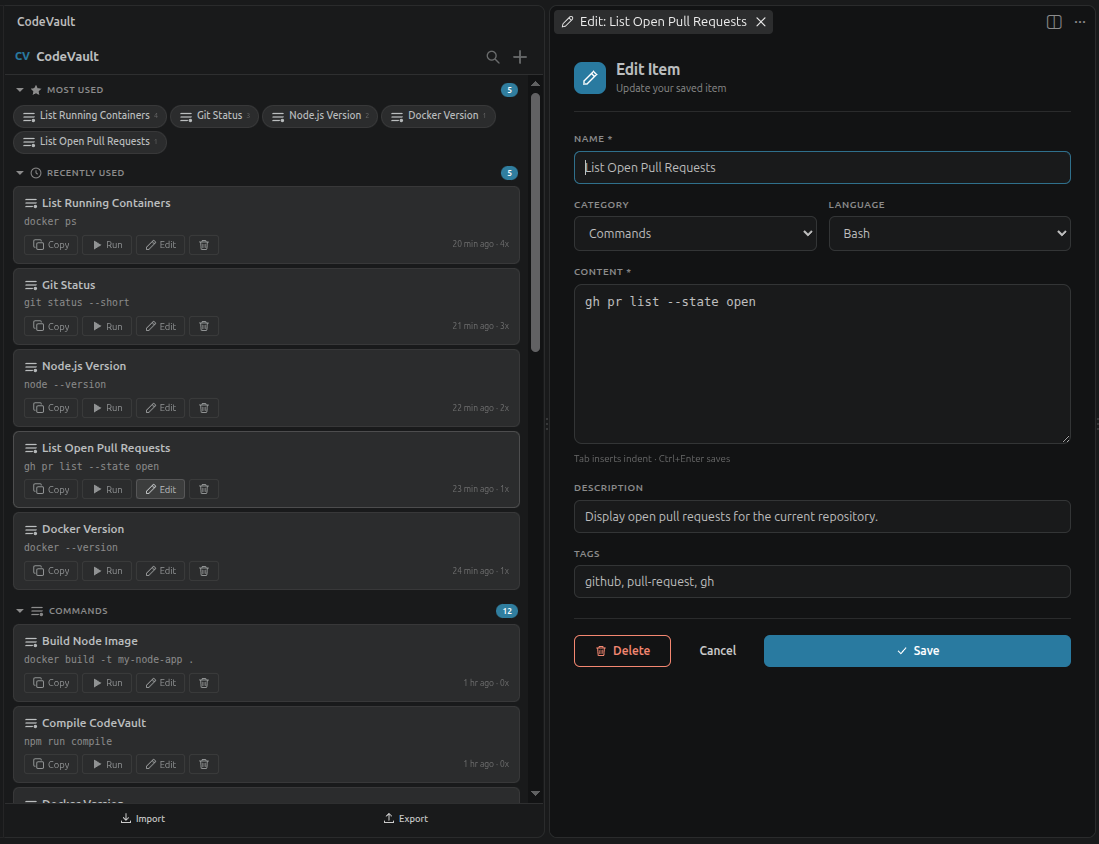
Command editor
A git command saved with its category, language, description, and tags.
Engineering highlights
- Commands, snippets, functions, and notes in one activity-bar view
- One-click copy or run directly from the sidebar
- Usage tracking that surfaces most-used and recent items
- Case-insensitive search across names, content, descriptions, and tags
- Versioned JSON import and export with validation
Why it exists
Code Vault started as a first application: a way to learn the VS Code extension surface while keeping the things a programmer reaches for constantly — shell commands, snippets, utility functions, notes, and text tags for AI agents — close to the editor. It is deliberately light: one activity-bar view, fast search, and one click to copy or run.
How it is built
Code Vault runs entirely on the VS Code API with no runtime dependencies. An extension host registers commands and orchestrates two services, and the interface is split into a sidebar webview for browsing and a separate editor webview for creating and editing items. State lives in VS Code's global state, so there is no database and nothing leaves the machine.
Data flow
Modules
Engineering decisions
Store everything in VS Code global state instead of a database
- Why
- Zero setup, no external process, and nothing written to the user's project
- Trade-off accepted
- Bounded storage and no cross-device sync unless explicitly opted in
Hand-write the webviews in plain HTML, CSS, and JavaScript
- Why
- No UI framework keeps the bundle tiny and lets the interface inherit VS Code's theme variables directly
- Trade-off accepted
- All rendering, escaping, and state sync is maintained by hand
Copy to the clipboard rather than insert directly into the editor
- Why
- The content is useful in the editor, the terminal, and chat alike, and the extension stays non-invasive
- Trade-off accepted
- The developer still presses paste at the cursor
Execute commands through a real VS Code terminal
- Why
- Commands run in the user's own shell, profile, and working directory
- Trade-off accepted
- The extension inherits the user's permissions, so a pattern guard blocks destructive commands
What was hard
Making a custom webview feel native to VS Code rather than like a bolted-on panel
Keeping the extension light while offering a rich, card-based interface
Executing user-authored shell commands without becoming a foot-gun
Where it stands
Code Vault is published on the Visual Studio Marketplace as rafa9-labs.codevault, with the full TypeScript source public under MIT. It was the first application shipped end to end — from the extension host and webviews through packaging and publication.
Known limitations
- Early distribution: 11 Marketplace installs at the time of writing
- State is stored in global state and is not opted into VS Code Settings Sync
- Search is case-insensitive substring matching rather than ranked fuzzy search
- No automated test suite; command validation is covered by manual testing